Back

Graphika v1.0

Building a SaaS Intelligence Platform

Graphika Platform

TL;DR

Graphika is a service-based social intelligence company. They wanted to transform their service-based model into a SaaS product. I was brought in as a Senior UX Designer to design the experience (not without significant technical constraints).

Results

  • ~20% reduction

    in time clients spent contacting support for data requests

  • Weekly → daily

    analyst insight delivery

  • ~90% daily active users

    within first month

  • Design as strategic function

    established within organization

Scroll for more details, if you dare. It's a lot of text.

Overview

Back to top

The Impact:

  • 90% of clients accessed the platform daily within the first month
  • ~20% reduction in time spent by clients contacting support
  • Improved analyst insight delivery from weekly to daily cadence

Context:

Graphika is a social intelligence company specializing in online influence operations and network analysis. They served government agencies and Fortune 500 companies with custom OSINT reports analyzing social media narratives, coordinated behavior, and information spread.

The service-based model had hit its scaling limits—every client needed custom analysis from specialized analysts, and demand was outpacing capacity. The company needed to transform into a software product that would give clients direct access to Graphika's data and analytical capabilities while preserving the depth of insight that made their service valuable.

The Problem:

For clients:

Accessing Graphika's insights required scheduling meetings with the client services team—a process that could take days. When urgent situations arose (a coordinated disinformation campaign, a sudden narrative shift), clients would often receive the insights days after the event had passed. The data behind Graphika's visualizations was opaque, making it difficult for clients to present evidence to their leadership or conduct their own analysis.

For Graphika:

Teams were building in parallel without shared priorities, leading to misaligned expectations and surprises during integration. New prospects struggled to understand what Graphika actually offered without seeing the product firsthand.

The constraint:

With the company's push toward a SaaS model, the backend was being completely rebuilt from scratch to support the new direction, meaning we'd need to launch with limited technical capabilities and expand iteratively.

My Role:

I joined Graphika as a Senior UX Designer working alongside a Design Lead. Together, we established the initial product direction and research foundation. Within three months, the Design Lead transitioned to a more technical role, and I became the sole designer responsible for the complete product design lifecycle—from research synthesis to final delivery. I facilitated cross-functional workshops, established design processes, designed the visual language, built the design system, and collaborated closely with product, engineering, and analyst teams.

Research & Discovery

Back to top

I started by getting up to speed with Graphika's technology and philosophy, then reviewing previous research from the lead designer, then conducted my own synthesis to understand our users deeply.

Hover to see how insights were clustered

Key Insights:

1. Trust requires transparency

Clients needed granular access to the data behind Graphika's visualizations to build trust with their own stakeholders. A beautiful network map wasn't enough—they needed to export the underlying data, understand the methodology, and trace insights back to individual posts.

2. Expertise gap threatens adoption

Graphika's technology (network analysis, community detection algorithms) had a steep learning curve. Client services spent hours walking new users through concepts. The platform needed to be a teaching tool, not just a data access tool.

3. Two user archetypes with different needs

Expert analysts wanted deep, self-serve exploration tools. Intelligence readers wanted pre-packaged insights they could quickly digest and share. We needed to serve both without compromising either experience.

4. Internal alignment was as critical as external UX

Siloed teams were building different parts of the product with conflicting assumptions. Design needed to be the connective tissue—creating a shared vision that aligned engineering, product, and go-to-market.

Design Process

Back to top

Working within significant technical constraints—the backend was being rebuilt from scratch—I had to make strategic design decisions that balanced ideal experience with engineering reality.

Early sketches and explorations

The early sketches were co-creation exercises designed to align team members on product strategy. I met with engineering and go-to-market teams to understand and align on technical and business developments. This allowed me to map both ideal and current states of the UI, which informed the layout and provided proper constraints for exploration.

Transition from wireframes to high-fidelity

Once the teams were aligned, we used the sketches to go straight into high-fidelity designs and iterate from those designs because the org was not used to working with anything that was low-fidelity.

The iterative process (months of iterations and reviews)

We leveraged the great relationship with our existing clients to rollout as soon as possible (bugs and all) and make updates continuously. We kept detailed notes on all types of feedback from clients and internal users. We used all of our previous artifacts to triage the feedback and inform upcoming design tasks.

A design challenge: Teaching network analysis to non-experts

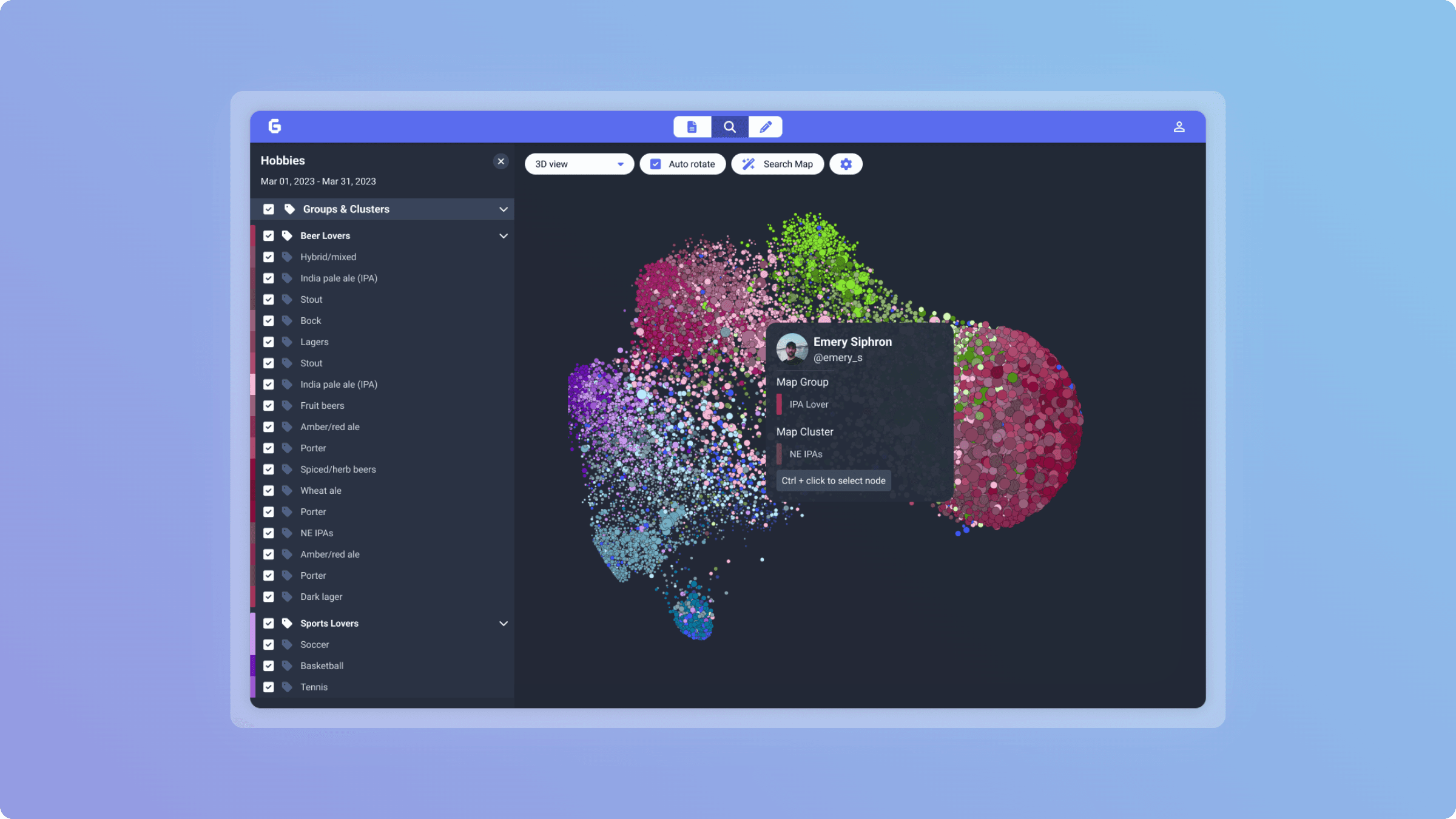
Our existing client base had an understanding of network visualizations, however, in our early release of the platform, we often got the same questions. They asked: "How do I know which cluster is important? Why is the network shaped like that? What does this mean for me?"

We realized the visualization alone wasn't enough—we had to teach users how to read it, even if they were already familiar with it. I added:

  • Contextual tooltips explaining each visual encoding (color = community, size = influence)
  • Client services would continue education during shareouts and onboarding, while collecting feedback
  • Added supplemental visualizations like timelines, overlays, and stance to improve the perspective on the data (added in the product rehaul)

This pattern—show the data, explain the methodology, supplement with dynamic visuals—became a framework we applied throughout the platform.

Design tradeoffs

As you can see, we were thinking deeply about these problems and trying to move fast. So there were some tradeoffs that came as a result. For example, clients needed direct access to the analysis done on specific social media posts behind each insight, but our backend couldn't yet query this data. Rather than delay the launch, I designed a workaround: analysts would upload CSVs of relevant posts to their insights, then manually add their analysis into the body of the text.

This wasn't ideal, but it gave clients the data access they needed while buying engineering time to build the proper API. Once the backend was ready months later, we seamlessly transitioned to the automated version.

Defining the Solution

Back to top

Based on research insights, we defined three core problems to solve for our first launch: provide direct access to Graphika's data, build a platform where our analysts can author insights for the client's viewing and ingesting, and help users understand Graphika's technology through unique visualizations.

Why This Structure Made Sense

Separating the product into three distinct spaces allowed us to:

  1. Ship iteratively - We could launch the client platform while building the analyst CMS in parallel
  2. Reduce cognitive load - Each user type (client, analyst, admin) got a focused experience
  3. Scale the team - Different engineers could own areas of the product without stepping on each other's toes
  4. Match the business model - The admin portal gave us the infrastructure to onboard new client orgs quickly

What we consciously de-scoped for v1:

  • Real-time data updates (would come further down the roadmap)
  • Advanced filtering/querying (started with basic search)
  • Custom report generation (analysts would create manually)

How we aligned stakeholders:

I facilitated a multi-day design sprint where we mapped user scenarios to features, voted on priorities, and created a phased roadmap. This artifact became our north star—whenever debates arose about feature scope, we'd reference the original scenarios and priorities we'd agreed on.

Building a design system in parallel

As the sole designer working with a distributed engineering team, I knew inconsistency would show as the number of screens grew, so I built a lightweight design system in Figma that included:

  • Core components (buttons, inputs, dropdowns, date pickers, filters, modals)
  • Data visualization patterns (charts, network views, sparklines)
  • Usage guidelines (when to use which component and what states are relevant to each scenario)
  • Semantic naming (so engineers could map designs to code)

This wasn't just a UI kit—it was a communication tool. When discussing features with engineering, I could say "use the map selector from the network viewer" and everyone knew exactly what I meant. It reduced back-and-forth and made our collaboration more efficient. The system worked well for the initial launch phase, but as the business began pivoting toward new markets (see next case study), maintaining it became challenging without dedicated design ops support.

Results & Impact

Back to top

Business Impact:

  • Platform became the foundation for Graphika's product business, enabling the company to serve 2x more clients with the same analyst team
  • Reduced sales cycle time—prospects could now see and try the product during demos instead of just reviewing static reports
  • Client retention improved as users could access insights on-demand rather than waiting for scheduled reports

User Impact:

  • 90% of clients accessed the platform daily within the first month
  • ~20% reduction in time clients spent contacting support for data requests
  • Analyst time to insight improved from weekly to daily cadence
  • For one major client, the platform became their exclusive intelligence dashboard, displayed 24/7 in their operations center

Platform Momentum:

The v1 launch proved the product model and created demand for deeper analytical features, setting the stage for the v2 redesign (see next case study).

What I'd do differently:

At the start, I was too focused on navigating technical constraints and not enough on team alignment. I assumed if I designed within the technical boundaries, the teams would naturally align around the solution. I learned that wasn't enough.

What I changed mid-project:

Around month 6, I added a running monthly "design review" that was opened to the company—they were not about critiquing design, but about creating a shared language about design. Engineers, PMs, analysts, and go-to-market folks would see work-in-progress and discuss not just feasibility, but desirability and viability. This ritual was a scaffold for how the team would collaborate and led directly to the phased roadmap that kept us aligned.

What I'd keep:

The aggressive "ship fast, iterate constantly" approach. Launching on my third week with a basic feed felt terrifying but it was the momentum that we needed to keep building and keep making decisions.